














Contents
Spinboss Registration
Spinboss registration takes about two minutes: click Register , pick one of four welcome offers (or enter a promo code, or skip the bonus), enter an email and password, confirm you are 18 or over, then complete your personal details on the second screen. The account opens immediately, deposits start from £9 (€10), and identity verification is only required before the first withdrawal or at AML thresholds. The casino welcome package chosen at sign-up is 400% up to £12,900 (€15,000) plus 400 free spins; crypto and sports alternatives are offered in the same window. Players must be 18+, and Spinboss is licensed in Costa Rica rather than by the UK Gambling Commission.
This page walks through each step of the Spinboss sign-up, compares the welcome offers available at registration, explains what to check in the form and covers the first deposit and verification.
The table summarises the Spinboss registration process.
| Parameter | Details |
|---|---|
| Where to register | Register button, top-right corner of the site |
| Form structure | Bonus choice + 2 registration screens |
| Details required on screen 1 | Email, password, age and terms confirmation |
| Screen 2 | Personal details for the account |
| Minimum age | 18 |
| Welcome offers | Casino, sport, casino crypto, sport crypto |
| Promo code | Optional field in the bonus choice window |
| Account currency | EUR or crypto (no GBP) |
| Minimum first deposit | £9 (€10); Bitcoin £26 (€30) |
| Verification | Before first withdrawal or at AML thresholds |
Before you register at Spinboss
A few points are worth checking before creating an account, as they affect how the account will be used later.
- Licence: Spinboss operates under a Costa Rica licence, not a UKGC licence, and is not part of GamStop.
- Currency: balances are held in euros or crypto, so UK cards are converted from pounds by the bank.
- One account per person: duplicate accounts can lead to blocked withdrawals.
- Accurate details: the name, date of birth and address must match your ID for verification later.
- Withdrawal route: Revolut, Neteller and Paysafecard are deposit-only, so it helps to plan a payout method in advance.
How to register at Spinboss step by step
The Spinboss sign-up opens as a pop-up with three stages: bonus choice, registration step 1 of 2 and registration step 2 of 2.
Step 1: choose a welcome bonus
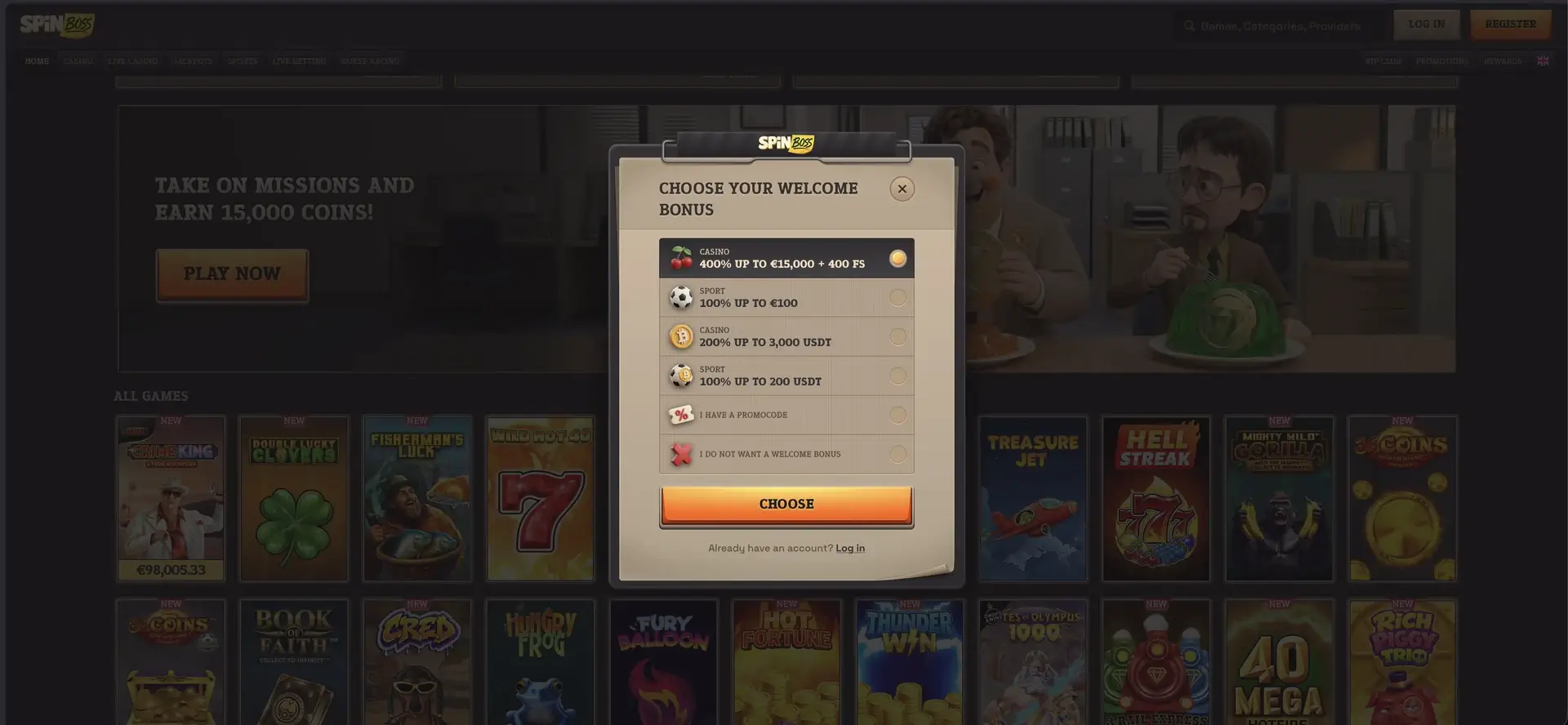
After clicking Register, the "Choose your welcome bonus" window appears. It lists six options, and one must be selected before continuing.
- Casino: 400% up to €15,000 + 400 FS (about £12,900).
- Sport: 100% up to €100 (about £86).
- Casino crypto: 200% up to 3,000 USDT.
- Sport crypto: 100% up to 200 USDT.
- I have a promocode: opens a field for a code.
- I do not want a welcome bonus: creates the account without a welcome offer.
Click Choose to move to the form. The selected offer stays visible at the top of the next screen, where it can still be changed through the drop-down arrow.
Step 2: enter email and password
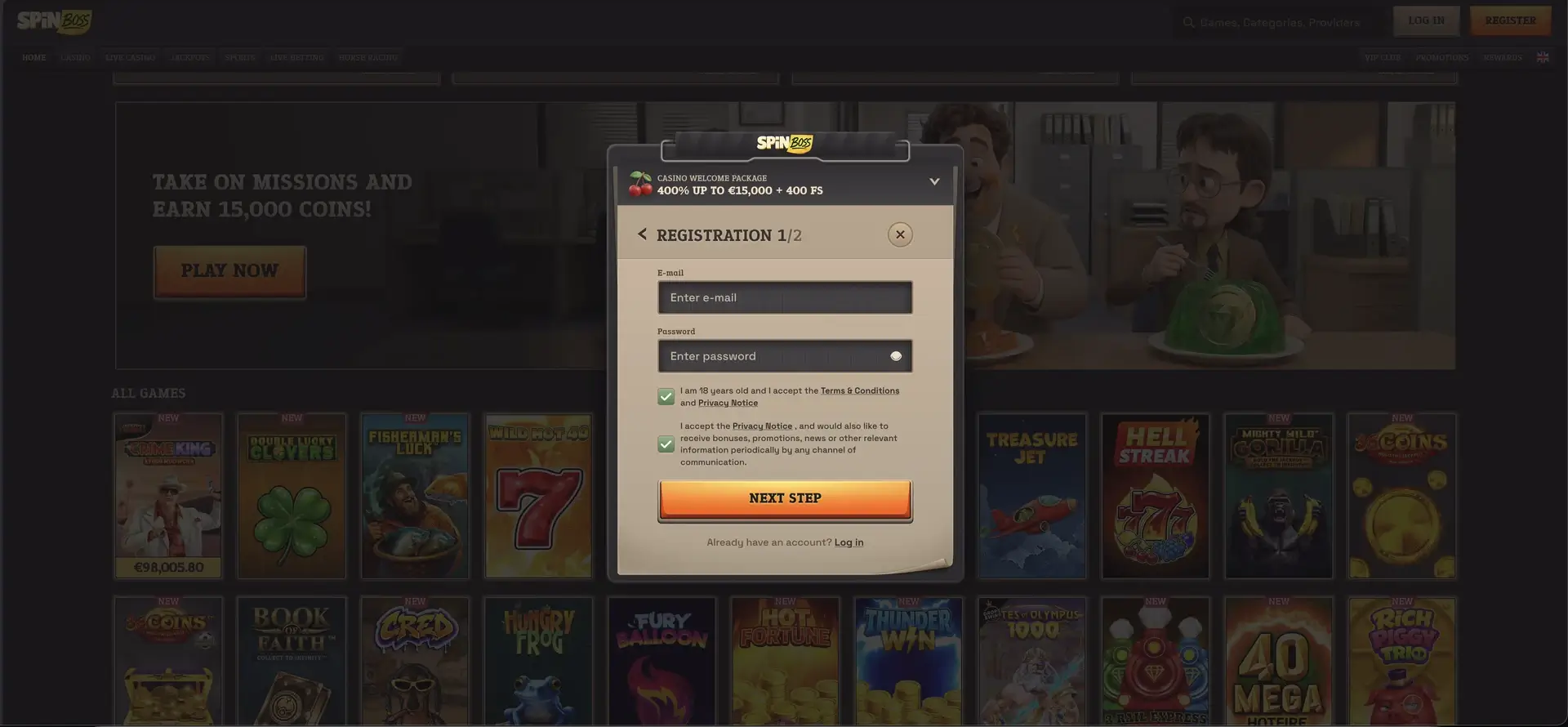
Registration screen 1 of 2 asks for the account credentials and two confirmations.
- Enter an email address you have access to - it will be used for login and password recovery.
- Create a password; the eye icon shows the characters so you can check them.
- Tick the first box to confirm you are 18 or over and accept the Terms & Conditions and Privacy Notice.
- Decide on the second box, which covers bonuses, promotions and news by any channel - it is pre-ticked and can be unticked if you do not want marketing messages.
- Click Next Step .
Step 3: complete personal details
Registration screen 2 of 2 collects the personal information linked to the account. These details should be entered exactly as they appear on your ID and proof of address, because they will be compared during verification. After confirming this screen, the account is created and you are signed in.
Which welcome bonus to choose at Spinboss registration
The bonus choice at sign-up is the most important decision in the registration process, as only one welcome offer can be claimed. The table compares the options.
| Offer | Value | Wagering | Best for |
|---|---|---|---|
| Casino Welcome Package | 400% up to £12,900 (€15,000) + 400 FS | 35x deposit + bonus; 40x spins; 10 days | Slot players who deposit by card or bank and can wager actively |
| Casino Crypto Welcome | 200% up to 3,000 USDT | 30x; 14 days to activate | Crypto players who prefer lower wagering |
| Sport First Deposit | 100% up to £86 (€100) | See offer terms | Football and racing bettors |
| Sport Crypto Welcome | 100% up to 200 USDT | See offer terms | Bettors depositing in crypto |
| No bonus | - | None | Live casino players and anyone who wants to withdraw without wagering |
Skipping the welcome offer is a reasonable choice for many players. It avoids the 35x turnover and maximum bet rules, and the account still qualifies for daily cashback, live cashback, reloads, missions and the VIP Club.
Using a promo code during Spinboss sign-up
A promo code is not required for any of the standard welcome offers. The "I have a promocode" option is intended for special offers distributed through partners, email campaigns or VIP managers. To use it, select that option in the bonus window, enter the code exactly as provided, and continue with the form. If a code is not accepted, live chat can confirm whether it is still valid.
First deposit after Spinboss registration
Once the account is created, the cashier opens from the account area. To activate the welcome bonus, the first deposit must meet the offer's minimum and use a qualifying method.
- Open the cashier and stay on the Deposit tab.
- Choose a method - Visa/Mastercard, Revolut, bank transfer, Skrill, Neteller, Paysafecard or crypto.
- Enter an amount within the limits shown next to the method.
- Confirm the welcome offer is selected before paying.
- Complete the payment and check that the bonus appears in My Bonus.
Two details matter for the welcome package: Skrill and Neteller deposits are excluded from parts of the offer, and the card deposit maximum of €2,000 is below the €3,750 needed to reach the full €15,000 bonus. Bank transfer, Revolut and crypto accept up to €5,000.
Spinboss account verification
Verification is not required to register or deposit. Spinboss requests KYC documents before the first withdrawal or when anti-money laundering thresholds are reached. Uploading them early saves time later. The usual documents are:
- Photo ID - passport, UK driving licence or national ID card.
- Proof of address - a utility bill or bank statement from the last three months.
- Proof of payment method - a card photo with middle digits covered or an e-wallet statement.
Registering on mobile
Spinboss has no app, and registration on a phone happens in the mobile browser. The bonus window and both form screens adapt to smaller screens and follow the same steps as on desktop. After signing up, adding the site to the home screen gives one-tap access for future logins.
Common Spinboss registration problems
If the sign-up does not complete, one of these issues is usually the cause.
- Email already registered: the address is linked to an existing account; use login or password recovery instead.
- Next Step button inactive: the 18+ and terms checkbox has not been ticked.
- Form does not load: clear the browser cache, disable script blockers and accept essential cookies.
- Promo code rejected: the code may have expired or be restricted to certain players.
- Region restrictions: access can be limited in some jurisdictions.
Spinboss registration FAQ
Short answers to common sign-up questions.
How do I register at Spinboss?
Click Register, choose a welcome offer, enter your email and password, confirm you are 18+, and complete your personal details on the second screen.
How long does Spinboss registration take?
About two minutes. The account is active as soon as the second screen is confirmed.
Do I need a promo code to register at Spinboss?
No. Welcome offers are selected in the registration window. The promo code field is optional.
Can I register at Spinboss without a bonus?
Yes. Select "I do not want a welcome bonus" in the first window.
Do I need to verify my account right after Spinboss registration?
No. Verification is requested before the first withdrawal or when AML thresholds are reached.
Can I open a Spinboss account in pounds?
No. Accounts run in euros or cryptocurrency. UK cards are converted from pounds by the issuing bank.